Distress Signal
Last updated: July 17, 2026
What is the distress signal?
If you need assistance during a ride, Verified members can send a distress signal. It places a live, flashing marker on the map for riders nearby.
Duration: 4 hours, with the option to extend.
When help arrives: you can cancel the signal at any time.
In an emergency
Call emergency services first. A distress signal does not contact emergency services and cannot guarantee that someone will respond.
Call 112 in most of Europe, 999 in the United Kingdom and Ireland, or 911 in the United States and Canada. See our Disclaimer.
Who can send a distress signal?
Send a signal: Verified members only.
See signals: every rider, on any membership tier.
Not a Verified member yet? You can upgrade in Settings, under Membership.
How long does a distress signal last? Can I extend it?
Duration: 4 hours. You can extend it as many times as you need, so it never has to run out.
There are two ways to extend:
From the notification: we remind you 30 minutes before it expires, so you can add another 4 hours without opening the app.
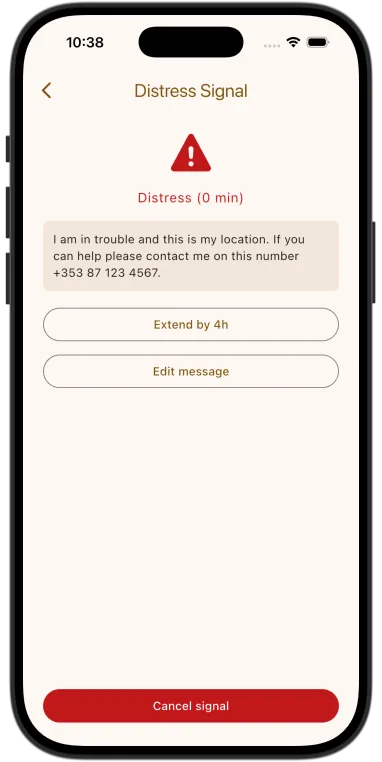
From the banner: while your signal is active, tap the banner at the top of the screen to open your Distress Signal screen, then tap Extend by 4h.
What does a distress signal look like on the map?
A distress signal appears as a flashing red marker with a warning triangle that pulses to stand out from the other markers on the map.
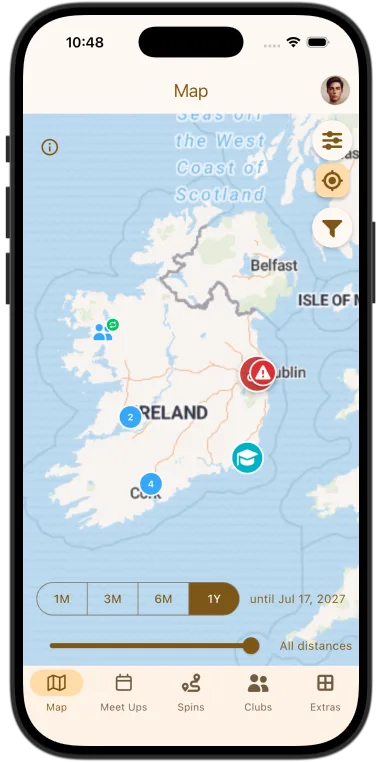
The marker also shows how current the rider's location is:
- Pulsing: the location is live and updating.
- "Last seen X minutes ago": their phone has lost signal or the app is in the background, so this is their last known position, not a live location.
What should I do if I see a distress signal on the map?
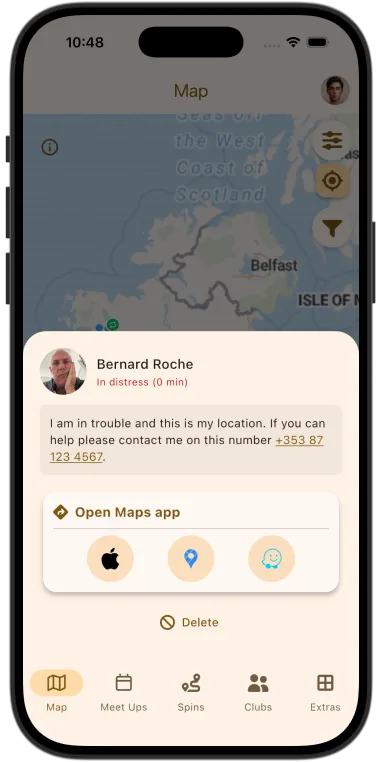
Tap the marker to see the rider's message and location. You can open Apple Maps, Google Maps, or Waze straight from there to navigate to them.
Then:
- Head towards them if it's safe to do so. If the marker shows "Last seen X minutes ago", treat that as their last known position.
- Riding in a group? The app doesn't coordinate responses, so if there are several signals, split up and make sure each has someone heading to it.
- If the situation is life-threatening, call emergency services when you reach them: 112 in most of Europe, 999 in the United Kingdom and Ireland, or 911 in the United States and Canada.
Can I cancel my distress signal?
Yes, at any time. Tap the banner at the top of the screen to open your Distress Signal screen, then tap Cancel signal. The marker disappears from the map straight away.
If you close and reopen the app while a signal is active, you'll be asked whether to keep or cancel it.
Why didn't I get a warning before my signal expired?
We send a notification 30 minutes before your signal expires. If it didn't arrive, notifications were probably blocked. Common causes:
- Do Not Disturb was on.
- Your phone was in low-power mode.
- Notifications are turned off for MotoClubHub.
Keep notifications enabled for the app while a signal is active so the reminder gets through. If a signal has already expired, you can send a new one straight away.
Will my distress signal keep updating my location?
Yes, as long as your phone has a GPS signal and the app is running in the background.
iOS may occasionally pause background location to save power. To keep your location as current as possible:
- Keep your screen on.
- Open the app every so often.
If your signal expires or stops updating, you can send a new one straight away.
Remember: a distress signal doesn't contact emergency services. In a life-threatening situation, call your local emergency number. See our Disclaimer.
A distress marker shows "Last seen X minutes ago." What does that mean?
The marker normally updates with the rider's live position every few minutes. When it shows "Last seen X minutes ago", those updates have stopped, usually because the rider's phone:
- lost its signal,
- ran out of battery, or
- suspended the app in the background.
The marker stays at their last known position and tells you how long ago it updated. Treat it as where they were then, not where they are now, as they may have moved since.
If the situation is life-threatening when you reach them, call your local emergency number.
What if I see more than one distress signal on the map?
Help the rider nearest to you first. The app doesn't coordinate responses, so each person acts independently.
If you're riding in a group, split up so every signal has someone heading towards it.
If a situation is life-threatening when you reach a rider, call your local emergency number.
Have a suggestion?
We'd love to hear from you. Email motoclubhub@mod72.com with your feedback or ideas.